Best AI Tools for Print on Demand in 2026
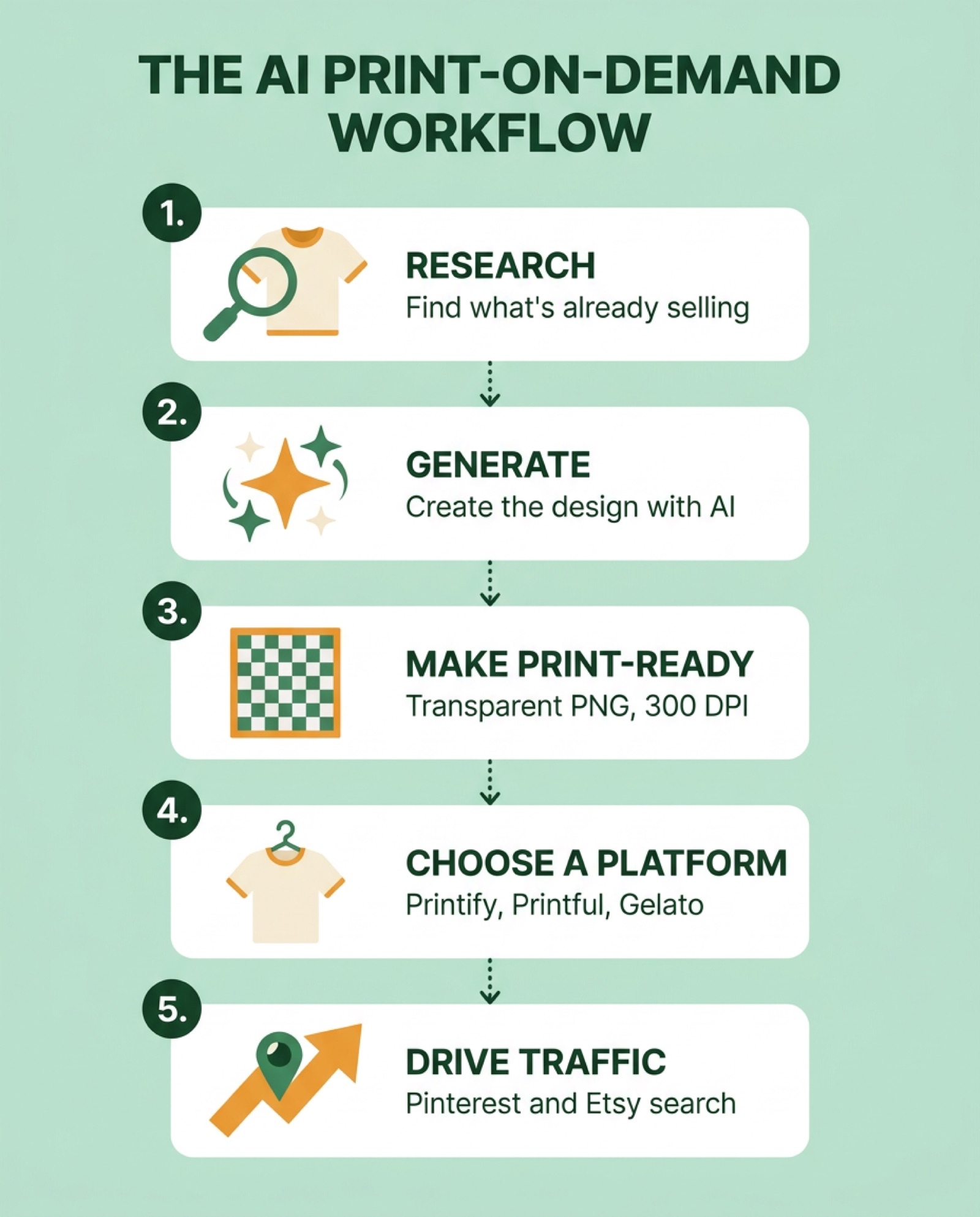
The best AI tools for print on demand in 2026 split into five jobs: research (Claude, ChatGPT, or a dedicated tool like Everbee), design generation (ChatGPT’s image model, Ideogram, Nano Banana, or Kittl), making the file print-ready (a background remover and an upscaler), the print provider itself (Printify, Printful, or Gelato), and free traffic (Pinterest, mainly). No single tool does all five well, and the creators actually running these workflows disagree on which tool wins each job.
This roundup pulls from 18 videos, about 3.5 hours of runtime, from 15 different print-on-demand creators and channels who published AI workflows in 2026. Every claim below links to the video it came from. Where creators disagreed, both sides are here, because that disagreement is more useful than a fake consensus.
Which AI tool is actually best for the t-shirt design itself?
There’s no single winner, and it depends on which model you’re comparing (see our free AI image generator comparison for credits and commercial rights on the general-purpose tools). Inside the print-on-demand niche specifically, Shirt School’s Kerry Egeler ran the identical prompt through 8 tools at their default settings and found ChatGPT’s image generator and Ideogram tied for the most usable, most text-accurate output, while Midjourney, Canva’s built-in AI, and Kittl’s default model underperformed until she manually switched the underlying model. Adrian Vonarx uses a different tool for each step of his own workflow: ChatGPT Image 2 for text-based designs, Nano Banana Pro for edits, and Seedream for photoreal work.
Here’s how the 8 tools from Kerry Egeler’s side-by-side test compared, at default settings, with no manual model switching:
| Tool | Result at default settings | Best for |
|---|---|---|
| ChatGPT (image gen) | Best text accuracy, ready to use | Text-heavy designs |
| Ideogram | Tied for best, closest to the reference style | Text-heavy designs |
| Leonardo AI | Auto-selected Ideogram, near-identical result | Same as Ideogram, cheaper via Canva bundle |
| Recraft | Strong composition, font didn’t match the brief | Illustration-first designs |
| Nano Banana 2 | Usable but needed prompt tweaks | Quick iteration |
| Midjourney | Text handling weaker than expected | Painterly, non-text art |
| Kittl (default) | Not usable out of the box | Only after switching its internal model |
| Canva AI | Not usable at default settings | Skip for t-shirt text |
Which AI tool should I use for print on demand text designs? Based on this test, ChatGPT’s image generator or Ideogram, since both handled the actual wording correctly where the others introduced typos or garbled letters.
One nuance from Ryan Hogue: a good-looking AI image isn’t the same as a production-ready file. His argument is that a raw chatbot export usually isn’t layered, isn’t vector, and isn’t sized for print, which is why he generates inside Kittl’s editor instead of pasting straight from ChatGPT. “A cool AI-generated image isn’t enough,” he says, “you need designs that are production ready.”
How do you write an AI prompt that’s actually print-ready?
A print-ready prompt needs two halves, according to Meg Heckman: a “design equation” (print method, art style, and mood) that tells the AI what the design should look like, and a technical half that tells it what the file needs to be. If you want more structured prompt-building patterns before you get to the technical half, our AI image prompt templates cover the same subject-context-style-technical layering for any AI image generator. Skip the second half and you get a pretty image that’s the wrong size, has a solid background, and needs manual cleanup before it can go anywhere near a print provider.
Her exact spec, reusable for any prompt: 4500 x 5400 pixels, 300 DPI, PNG, transparent background, sRGB color, plus an instruction not to use copyrighted characters, logos, or trademarked fonts. “The AI didn’t fail,” she says of the common complaint that AI t-shirt designs look like clip art. “It was the prompt that failed.”
Jensen Tung confirms the size matters on the print-provider side too: Printify auto-upscales images under its recommended resolution, and the result looks visibly softer than a file that was generated at full size from the start.
A few other prompt-building notes worth carrying over:
- Santi Hustle found that ChatGPT alone can’t reliably hold a design steady across mockups; asking it to place the same graphic on a mockup photo tends to shift small details each time, which breaks listing consistency.
- Ryan Hogue’s remix rule: take the emotional hook of a proven design, not its visuals, and ask an AI chatbot for entirely new objects that carry the same feeling. His example fed one nostalgia-themed bestseller into Gemini and got back 10 completely different trio concepts.
- Never feed someone else’s design into an AI tool as a reference image. Philip Anders is blunt about it: use your own past designs or public-domain art, not an Etsy or Amazon bestseller you don’t own.
Which tool should you use to research what actually sells before you design anything?
The research step, not the generation step, is what most creators point to as the real bottleneck. Adrian Vonarx screenshots a page of Etsy best-sellers and feeds it to Claude, asking for a trend report on niches, styles, and keywords before generating a single design. Rochelle Be does something similar with Claude’s web search turned on, cross-checks the results in ChatGPT, then validates demand in Everbee before committing to a niche.
Everbee shows up across more videos than any other single tool in this roundup, used by Adrian Vonarx, Jensen Tung, Rochelle Be, and Print On Demand - RJ Martinez to pull estimated Etsy sales, revenue, and conversion rate data that Etsy itself doesn’t show publicly. RJ Martinez’s specific move: export a competitor’s full listing data from Everbee’s shop analyzer, drop it into Claude with a “reverse-engineer why this store is winning” prompt, then generate new design concepts in Ideogram based on what Claude found.
For Amazon Merch specifically, Philip Anders uses Flying Research, and Ryan Hogue uses Merch Dominator, both of which filter Amazon’s catalog down to what’s actually selling and let you describe a found design as an AI prompt directly inside the research tool.
What’s the fastest way to validate a print-on-demand niche? Screenshot what’s already selling on Etsy or Amazon, feed it to an AI chatbot for a trend breakdown, then confirm real sales numbers in a research tool like Everbee before you design anything.
Which print-on-demand platform pairs best with AI?
There’s no single “best” platform, but the four that came up most had different AI strengths:
| Platform | AI strength | Notable limitation mentioned |
|---|---|---|
| Printify | Built-in OpenAI-powered generator, free tier fully usable | Auto-upscales low-res uploads, looks softer than native 300 DPI |
| Printful | Clip-art AI suggestions, fast Etsy/Shopify/TikTok Shop connect | Fewer built-in bulk-generation tools than My Designs or Kittl |
| Gelato | ”Magic Mockups” places a product into any described scene; design editor includes Shutterstock’s 360M+ image library | Premium features gated behind Gelato Plus |
| My Designs (mydesigns.io) | Bulk AI generation, bulk vectorize, bulk background removal, bulk publish | Built for volume sellers, more setup than a single-listing workflow |
Kimberly Mitchell walks through Gelato’s magic mockups and its Shutterstock integration in a full step-by-step build. Philip Anders rates My Designs as his most-used tool specifically because every step, from generating to publishing, works in bulk instead of one listing at a time.
None of the 18 sources reported any restriction on using AI-generated art on these platforms. Several build their entire workflow around a platform’s own built-in AI generator, including Julia McCoy on Printify and AIToolSpott’s review, which credits AI with handling “90%” of one seller’s design and mockup work.
Can AI actually generate your mockups and marketing videos too?
Partly, and the creators don’t agree on how far to trust it. Philip Anders demoed Google Mixboard (built on Nano Banana) generating up to 20 design or mockup variations from one prompt and reference image, keeping the same model’s pose and background consistent across the batch. That’s a strong result, but Mixboard was US-only at the time he filmed it, which he worked around with a VPN.
On the other side, Santi Hustle specifically warns that asking ChatGPT to place a design onto a mockup photo shifts small details each time, which he calls unacceptable when a listing needs the same design shown consistently across multiple photos. His fix is to do mockups inside a dedicated tool like Kittl instead of a general chatbot.
For marketing video, Adrian Vonarx uses Kittl’s UGC video templates, which drop a product mock-up into a pre-built “get ready with me” style scene and regenerate an AI actor around it. He calls out Seedance 2.0 specifically as the video model he keeps for realism. If you just need a short AI prompt for a product spin or turntable shot rather than a full UGC template, our sister site’s free AI product video prompt tool writes that prompt for you, no subscription needed.
How do you get free traffic to an AI-designed product?
Pinterest comes up as the most-recommended free channel, ahead of Instagram or TikTok, because pins keep sending traffic to a listing for months instead of dying out after a day or two. Kimberly Mitchell cites Pinterest’s own Q2 2026 report of around 640 million monthly active users, and notes the platform connects directly to both Etsy and Shopify so a new listing automatically gets pinned. Rochelle Be uses Pinterest specifically to avoid running paid ads as a beginner, since a shoppable pin can link straight to a product page.
Etsy’s own search is the other major free channel. Wholesale Ted breaks down Etsy’s ranking system as a three-phase “multi-armed bandit”: new listings get a small batch of test impressions, and only listings that convert during that test get expanded to a wider audience, which means a brand-new store gets a fair shot regardless of follower count or reviews.
One more traffic data point: Jensen Tung cites Etsy’s own statement that listings with a video attached get roughly twice as many orders as listings with photos alone, which is a reason several creators pair every design with a short AI-generated product video.
Is print-on-demand with AI actually profitable in 2026?
Several creators cite specific dollar figures, and all of them are self-reported or platform-estimated, not audited numbers, so treat them as directional rather than verified. Meg Heckman reports one ChatGPT-made t-shirt earning over $8,000 in two months. AIToolSpott cites a seller who made $4,200 in a month on Printify. Print On Demand - RJ Martinez points to Everbee’s shop-analyzer estimate of roughly $840,000 in total revenue for one Etsy store he reverse-engineered, which is Everbee’s own estimate, not an audited figure. Kimberly Mitchell cites unnamed market research putting the global print-on-demand market above $12 billion and growing around 20% a year.
What the sources agree on more reliably than any dollar figure: volume matters more than any single design. Stores with hundreds to thousands of listings show up repeatedly as the successful examples, while a handful of designs is treated as a starting point, not a strategy, across Adrian Vonarx, Jensen Tung, and Print On Demand - RJ Martinez.
Frequently asked questions
Can ChatGPT create t-shirt designs? Yes. Multiple creators use ChatGPT’s image generator directly for t-shirt graphics, and it tied for the most text-accurate result in Kerry Egeler’s 8-tool comparison. The catch is output size: Santi Hustle notes ChatGPT’s default export is only 1024x1024 pixels, well under standard print dimensions, so it needs upscaling before it’s production-ready.
Do you need a design tool on top of an AI image generator? Most of the creators here use one. A raw AI image usually isn’t layered, isn’t vector, and isn’t the right print size, so tools like Kittl, Canva, or a platform’s built-in editor handle the cleanup step: background removal, upscaling, and text layout that stays editable after generation.
Which platform should a beginner start with, Etsy or a standalone Shopify store? The creators split. Jensen Tung and Rochelle Be prefer a standalone Shopify store to avoid Etsy’s per-listing fees and keep customer ownership. Kimberly Mitchell, Glowithgia, and Adrian Vonarx treat Etsy as the easier starting point for beginners because of its existing buyer traffic.
What image dimensions should an AI print-on-demand design be? 4500 x 5400 pixels at 300 DPI, exported as a transparent-background PNG in sRGB color, per Meg Heckman’s tested prompt spec. Lower resolutions get auto-upscaled by print providers and come out visibly softer.
Print on demand is one of several AI side hustles people are testing right now. See our roundup of what 19 creators found running AI side hustles for 30 days for how it compares to dropshipping, AI-generated content sales, and freelance methods.